

Shared expenses for Australian share houses

Stop being the housemate who does the maths.

Scan the grocery receipt, leave personal items with the right person, and see who owes whom. Less working it out. Less chasing it up.

QR code that opens Ghar on the App Store

On your computer?Scan with your iPhone camera to open the App Store.apps.apple.com/app/id6804498149

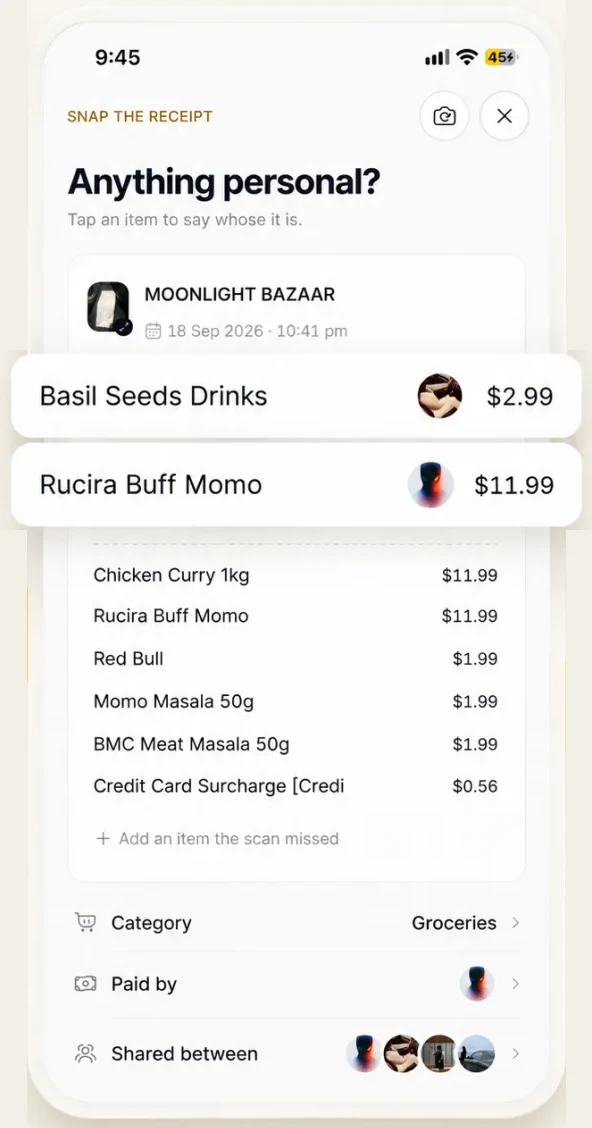
Ghar's receipt screen asking “Anything personal?”, with two grocery items tapped to the housemates who bought them
The receipt screen in Ghar. Tap an item to say whose it is.

One month, one house

The month is worked out. Everyone knows their share.

Four housemates and three shared bills. Aayush bought the groceries, Nisha paid the utilities, Pratik got takeaway and Sujal paid nothing. Ghar works out every balance and the payments that clear them.

Pay each other using your bank. Record it in Ghar.

Download on the App Store

$360 spent$90 each2 payments

Two payments and everyone is square

  • SujalNisha$90
  • PratikAayush$30

After these two, all four balances are back to $0.

Illustrative equal-split example, not a real household result.

Why Ghar

Fair for the whole house, without a spreadsheet.

Your extras stay yours.

Scan the receipt, then tap an item to say whose it is. Personal items go to that person; the rest of the receipt is shared. Who paid stays the same.

$84 groceries · paid by Aayush

  • Oat milkOnly Nisha$6
  • Protein barsOnly Pratik$14
  • Everything elseShared four ways$64

Aayush $16Nisha $22Pratik $30Sujal $16

Illustrative example, not a real receipt.

Away for a week? Your split should reflect it.

Log Time away once. When you add a household bill like power, choose Days home and it splits by the days each person was home. Equal stays the default; you choose Days home bill by bill.

$330 power bill · 1 to 30 September

  • Aayush30 of 30 days home$90
  • Nisha30 of 30 days home$90
  • Pratik30 of 30 days home$90
  • Sujal20 of 30 days home$60
Illustrative example, not a real bill. Sujal was away 11 to 20 September: 10 days, counting both ends.

One clear money map.

Ghar turns the month into a short list of payments: who pays whom, and how much. Copy the PayID, pay from your bank, then tap Paid. The person paid taps Got it. Share the result as an image or text.

Who pays whom · 2 payments

  • Sujal pays NishaPayID shown on the slip$90 Copy PayID
  • Pratik pays AayushPratik tapped Paid$30 Aayush: Got it
Illustrative: the payments from the example above, drawn for this page. Not an app screenshot.
The finer points
  • Rest of the bill. When the items don't add up to the receipt total, the difference shows as Rest of the bill and is shared like any item nobody took.
  • Pay later. Can't pay yet? Pay later, or pay part now, and the rest becomes a locked IOU.
  • Mark as not paid. If a payment marked Paid never arrived, the person owed can tap Mark as not paid instead of Got it.

Starting a house

Three steps, and you don't need everyone on day one.

  1. Create the house

    Sign in with Google, or Apple on iPhone, then tap Start a house. Add the house name and address and tap Create house.

  2. Invite the others

    Send a 6-character code, a link, a QR or an email invite. Or tap Later and invite them when you are ready.

  3. Add the first expense

    Scan a receipt or type it in. A house of one can start straight away, and a placeholder covers anyone who won't install Ghar.

Questions

Before you bring the house.

Straight answers about money, privacy and accounts. The full detail is in the privacy policy and terms.

Download on the App Store
Is Ghar free?

Yes. No card and no per-person fee. Receipt scanning, house settle-up and trips are all included. Scanning has a fair-use limit, so a very busy hour can show “Too many scans for now”.

How do I start a house, rather than join one?

Sign in, tap Start a house, add the name and address, then tap Create house. Next you can invite people by code, link, QR or email, or tap Later. Joining someone else's house? Choose Join a house and scan their QR or enter their code.

Does every housemate need an account? Can I start before they join?

No, and yes. Add a placeholder for anyone who won't install Ghar; they can claim it later with a code. A house of one can add expenses, and with placeholders it can split and settle before anyone else installs. Trips are different: everyone on a trip needs to be on Ghar.

Does Ghar send or hold our money?

No. Ghar records who paid, who owes whom and who has paid back. You pay each other from your own bank, for example by PayID, then record it in Ghar. Ghar is not a bank or a payment service.

Does Ghar need my bank login?

No. Ghar doesn't connect to your bank and doesn't collect bank logins.

Who can see our expenses?

House expenses: everyone in that house. A friend ledger: only the two of you see the entries between you, and house admins can't. A trip: only its members. Someone with a trip link who isn't signed in sees the trip name, dates and first names, never amounts. Some processing happens outside Australia; the privacy policy lists where. To delete your account, see Support.

Is Ghar on Android?

Yes, as a direct download from this website. It isn't on Google Play yet. The Android page lists the version, file size and checksum, and how updates work.

Can I use it with just one friend, or for a trip?

Yes. Keep a friend ledger with one person, or start a trip and invite the group by QR or link. Neither needs a house.

Ghar vs Splitwise

Free where it matters.
Made for a shared home.

Splitwise has a free tier and a paid Pro plan. Ghar is free, with receipt scanning, bill splits by days home, friend IOUs and trips in the same app.

What you needGharSplitwise
Scan and itemise a receipt FreePro
Take personal items off a scanned grocery bill FreePro
Expenses you can add each day on the free plan No daily capUp to 4

Splitwise details checked 14 November 2026 against its official Pro guide and free-tier limit guide.

Not just the house.

Also in Ghar

  • Time away Log days away once and Days home bills use them.
  • Alerts House alerts everyone can see and react to.
  • Shopping list One list for the whole house.
  • Inbox and badges Money, house and Ghar updates in one place, with counts on Home.
  • Chat with us Help, ideas and bugs, with replies back in Inbox.

Free on iPhone

Bring the house.
We'll handle the maths.

Free. No card. No per-person fee. On Android it's a direct download.

Download on theApp StoreAndroid: direct download
QR code that opens Ghar on the App Store

On your computer?Scan with your iPhone camera to open the App Store.apps.apple.com/app/id6804498149